


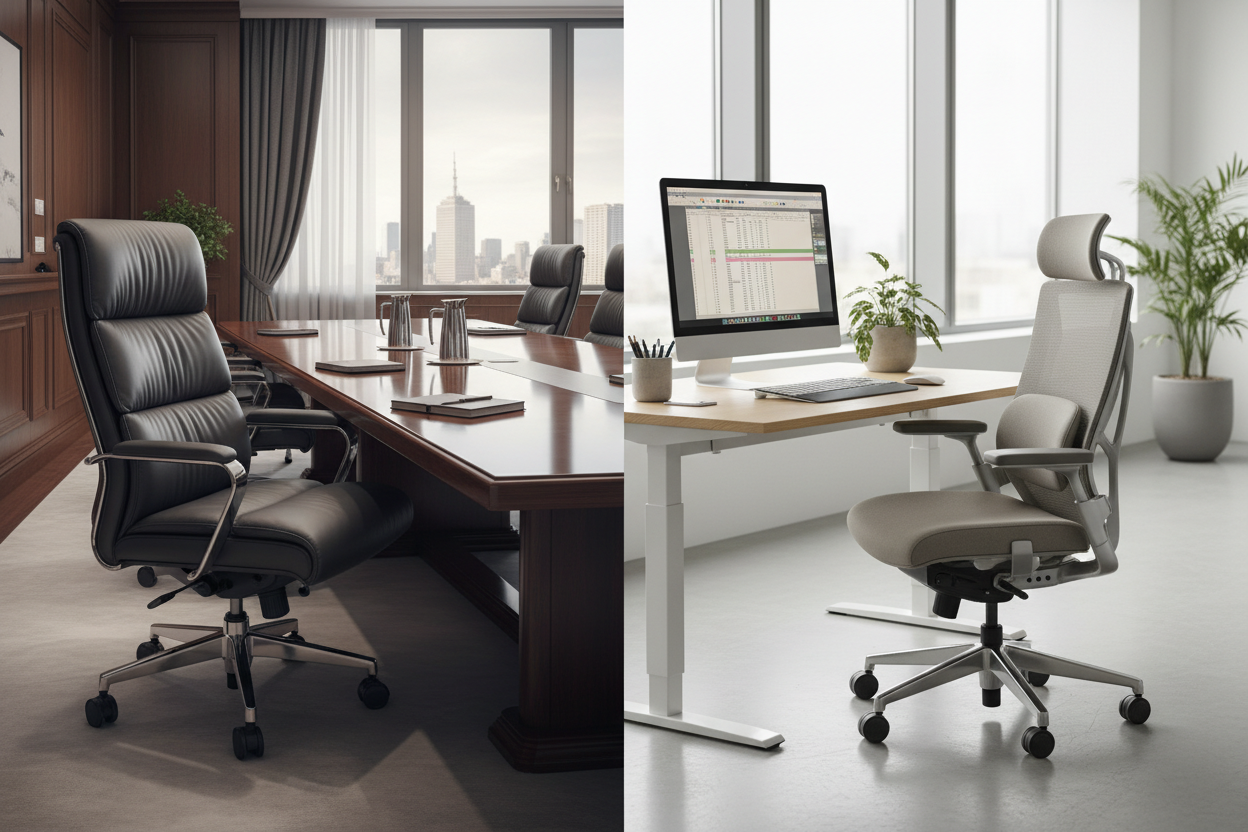
Direct Answer: Boardroom Chairs vs. Task Chairs
The primary difference between a boardroom chair and a task chair is ergonomic adjustability tailored to sitting duration. Task chairs are engineered for 8-hour intensive desk work, featuring 3-lever mechanisms for independent seat pan and backrest tilting to support individual posture. Boardroom chairs are designed for short-term active meetings (1 to 3 hours), featuring synchronized center-tilt mechanisms, fixed armrests, and sleek visual profiles to maintain a uniform, executive aesthetic around a meeting table.
1. The Ergonomic Mission: 8-Hour Focus vs. Active Collaboration
Specifying commercial seating requires matching the hardware to the employee's operational workflow. A common mistake in office fitouts is purchasing visually impressive executive chairs for the open-plan sales floor, only for staff to complain of back pain weeks later.
The distinction lies in the intended duration of use. A task chair is a highly personal piece of equipment, meant to be custom-calibrated to a single user's body for a full work day. Conversely, a boardroom chair is a shared asset. It must comfortably accommodate five different body types in a single afternoon without requiring complex, time-consuming mechanical adjustments between meetings.
2. Task Chairs: The 3-Lever Standard
To meet strict Australian WHS (Work Health and Safety) ergonomic compliance for continuous VDU (Visual Display Unit) operators, a high-quality task chair relies on a 3-lever or 4-lever mechanism.
- Independent Adjustability: Users can independently adjust gas-lift height, backrest angle, and seat pan tilt. This prevents the pelvis from rolling backward during long periods of typing, ensuring the lumbar spine remains in a neutral curve.
- Armrest Modularity: Task chairs often feature highly adjustable armrests (height, width, and pivot) or omit them entirely to allow the user to pull their chair flush against their desk keyboard without obstruction.
3. Boardroom Chairs: Executive Aesthetics and Dynamic Tilt
Boardroom seating prioritizes visual authority and immediate comfort. These chairs are engineered to look identical around a large meeting table, preventing the messy, uneven skyline created by dozens of individually adjusted task chairs.
- Synchronized Mechanism: Instead of multiple levers, boardroom chairs typically utilize a single-lever synchronized or center-tilt mechanism. When the user leans back during a presentation, the backrest and seat pan tilt together at a fixed ratio (usually 2:1), keeping the user's feet planted firmly on the floor.
- Fixed Armrests: Executive and boardroom chairs almost universally feature fixed, polished aluminum or upholstered armrests. This provides a structural resting point for executives reviewing documents or engaged in active conversation.
4. Seating Specification Matrix
Use this data matrix to allocate your procurement budget to the correct seating zones.
| Specification | Task / Operator Chair | Boardroom / Executive Chair |
|---|---|---|
| Intended Sitting Duration | 8+ Hours (Continuous) | 1 to 3 Hours (Intermittent) |
| Mechanism Type | 3-Lever / Independent Tilt | Single-Lever / Synchronized Tilt |
| Armrest Configuration | Adjustable (3D/4D) or Absent | Fixed (Loop or Cantilever) |
| Primary Venue Zone | Open-Plan Desks, Call Centers | Meeting Rooms, Private Offices |
5. Spatial Flow and Table Clearance
When outfitting a meeting room, you must calculate the physical footprint of your chosen chairs against the dimensions of your boardroom table.
Because boardroom chairs utilize fixed armrests, you must ensure the armrest height does not clash with the underside of the table or the structural beams supporting it. If a chair cannot tuck fully under the table when empty, it will consume valuable egress space, potentially violating WHS clearance guidelines (which mandate a minimum 1200mm pathway behind seated participants). Always cross-reference the chair's maximum width with the linear space allocated per person (typically 600mm to 700mm) to prevent guests from bumping elbows during critical meetings.
Upgrade Your Office Seating
Protecting your team from repetitive strain injuries starts with the right hardware. By dedicating 3-lever task chairs to your primary workstations and reserving synchronized executive chairs for collaborative hubs, you optimize both employee health and corporate aesthetics.
Ready to test the mechanisms for yourself? Browse our extensive range of commercial seating online, or Contact Us to request ergonomic specifications and volume fitout pricing from the McLernons Business Base team.